


Step 1 – Log in to ThemeForest with your Envato account.
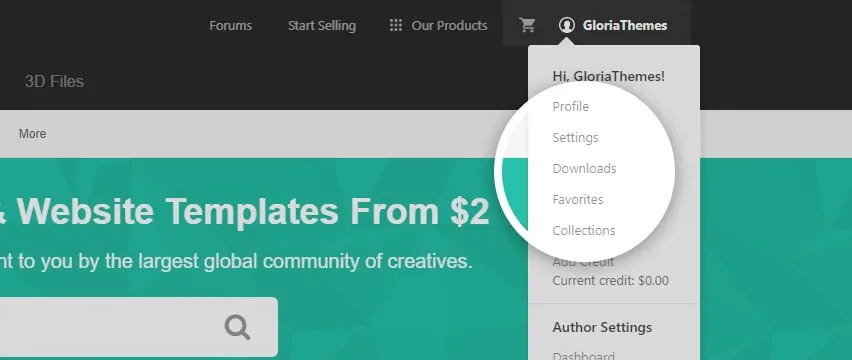
Step 2 – Navigate to the Downloads tab. Your all purchases and items appear in this page.
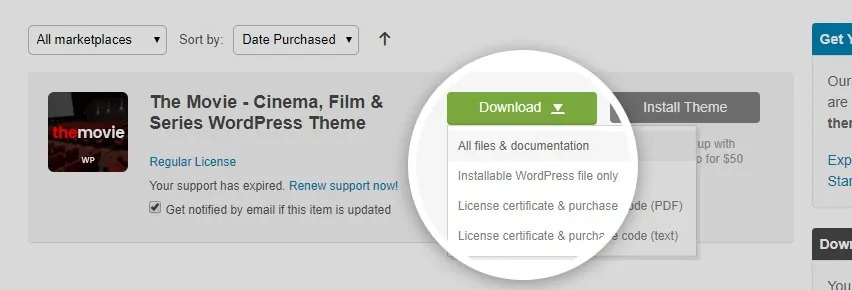
Step 3 – Locate Digimart, and click the Download button.
Step 4 – Choose between All Files & Documentation or Installable WordPress File Only.
Files Included in the ‘All Files & Documentation’ File #
This file contains documentation files, theme files, demo contents, plugins files etc.
- Main Theme – This contains theme installation files.
- digimart.zip – You can install the theme with digimart.zip via the WordPress admin panel.
- digimart – This contains manual theme installation files via FTP.
- Child Theme – This contains child theme installation files.
- digimart-child.zip – After installing the digimart.zip, you can install the child theme with digimart-child.zip via the WordPress admin panel.
- digimart-child – This contains manual child theme installation files via FTP.
- Documentation – This contains the theme document files.
- Demo Content – This contains the demo content files. There is a visual demo importer in Digimart, but since some customers need these files, it has been added here as an extra.
- Licensing – This contains two documents about licensing.
Files Included in the ‘Installable WordPress File Only’ File #
This file contains installable WordPress theme file is just the digimart.zip file.


